E Shram Card Check Balance 2026 – Official Guide
What Does “E Shram Card Balance” Actually Mean?
Let’s clear up something that confuses a lot of workers. Your E Shram Card is not a prepaid wallet. There is no “balance” sitting inside the card itself the way money sits in a Paytm wallet. What people really mean when they search “e shram card check balance” is this — “Has my government payment, relief money, or DBT installment reached my bank account yet?”
That’s the right question. And the answer lives in three places: the PFMS portal, state welfare portals, and the UMANG app. This guide walks you through each one, step by step, with no fluff and no confusion.
Who Gets Paid? Understanding DBT and E Shram Together
The central government sends welfare payments through a system called DBT — Direct Benefit Transfer. Every rupee meant for unorganized workers goes directly into the Aadhaar-linked bank account registered on eshram.gov.in. No middlemen, no cash counters.
State governments — especially Uttar Pradesh, Madhya Pradesh, and Bihar — also release separate maintenance allowances (locally called Bhartan Poshan Bhatta) to e-Shram card holders during economic distress periods. These typically come in ₹500 or ₹1000 installments and are tracked through state-specific portals.
So depending on where you live and what scheme you are enrolled under, you might be checking for:
- Central government DBT payments via PFMS
- State government relief installments via state labour portals
- Scheme-specific status like PMSBY insurance or PMMVY maternity benefits
All of these methods are covered below.
Method 1: Check E Shram Payment Status via PFMS Portal (Best for All India)
The Public Financial Management System (PFMS) at pfms.nic.in is the official digital backbone for all government-to-citizen fund transfers in India. PFMS shows the complete history of all government credits to your specific account — not just one scheme, but every DBT payment linked to your bank account. This is the most reliable method for e-Shram workers across all states.
What you need before starting:
- Your bank account number (as registered on e-Shram)
- Bank name
- Access to the mobile number linked to your account
Steps to check your e-Shram balance on PFMS:
- Step 1 — Open your browser and go to the official portal:
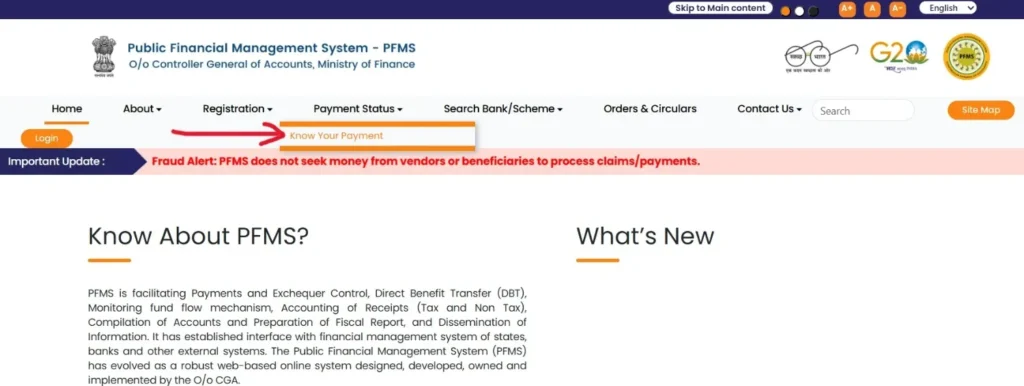
pfms.nic.in - Step 2 — On the homepage, look for the “Know Your Payment” option. You will find it under the Payments section in the top navigation menu.
- Step 3 — Select “Search by Account Number” from the options given.
- Step 4 — Choose your Bank Name from the dropdown list. PFMS supports all major banks including SBI, PNB, Bank of India, HDFC, ICICI, Axis, and regional rural banks.
- Step 5 — Enter your Bank Account Number carefully. Re-enter it in the confirmation field to avoid typo errors.
- Step 6 — Solve the CAPTCHA shown on screen.
- Step 7 — Click “Send OTP on Registered Mobile Number.” Enter the OTP once you receive it.
- Step 8 — Your complete DBT payment history will appear — including the scheme name, date of credit, and the exact amount transferred.
Important: PFMS only shows the history of government payments made to your account. It is not a banking application and will not show your personal deposits, withdrawals, or total savings balance. For your full bank balance, use your bank’s mobile app or passbook.
Method 2: Check E Shram Balance via UMANG App (Smartphone Method)
For workers who prefer managing everything from their phone, the UMANG app (Unified Mobile Application for New-age Governance) is the most convenient option. Users can check their E Shram card balance using the UMANG app as one of the official convenient methods available. Rupeezy
Steps:
- Step 1 — Download the UMANG app from the Google Play Store or Apple App Store if you haven’t already. It’s free and official.
- Step 2 — Log in using your mobile number and MPIN, or verify with an OTP.
- Step 3 — In the search bar, type “PFMS” and open the service.
- Step 4 — Select “Know Your Payment Status.”
- Step 5 — Enter your bank account details. The app will pull the same DBT transaction history available on the PFMS website, showing you exactly when the e-Shram installment was processed and credited.
The UMANG app also lets you access your e-Shram dashboard, download your UAN card, and update your profile — all in one place. Worth keeping on your phone.
Method 3: Check Balance via E Shram Portal Dashboard Directly
This is the quickest route if you just want to confirm your registration is active and check for any flagged payment issues.
- Step 1 — Visit
eshram.gov.in - Step 2 — Click on “Already Registered? Update” or the Login button.
- Step 3 — Enter the mobile number linked to your Aadhaar and fill in the captcha.
- Step 4 — Click “Send OTP” and verify.
- Step 5 — After successful login, go to your dashboard. Access your account to view your E Shram Card balance, UAN, and benefits from this dashboard.
- Step 6 — Navigate to the “My Account” or “Payment Status” section. If any DBT payment has been processed or flagged against your profile, it will appear here along with the scheme name and status.
How to Check E Shram Payment Status via Aadhaar Number
Some workers don’t remember their bank account number but have their Aadhaar handy. Here’s how to use it:
On PFMS:
- Step 1 — Go to
pfms.nic.in→ “Know Your Payment” - Step 2 — Instead of selecting “Account Number,” choose the “Search by Aadhaar Number” option.
- Step 3 — Enter your 12-digit Aadhaar number.
- Step 4 — Complete the CAPTCHA and click Search.
If your Aadhaar is linked to your bank account, this provides a quick method to check your payment status directly. All DBT payments made to that Aadhaar-linked account will appear in the results.
What the Payment Status Messages Actually Mean
When you check on PFMS or the e-Shram portal, you might see different status labels. Here’s what each one means in plain language:
| Status Shown | What It Means | What You Should Do |
|---|---|---|
| Payment Initiated | Government has approved and sent the money | Wait 3–5 working days for bank credit |
| Payment Success / Credited | Money has reached your bank account | Check your bank passbook or SMS |
| Account Validation Failed | Bank account or IFSC details mismatch | Visit your bank branch to correct details |
| Payment Rejected / Returned | Money bounced back due to Aadhaar seeding issue | Get Aadhaar seeded at your bank |
| Pending / Under Process | Payment is queued but not yet released | Check back after 7 working days |
E Shram Card Benefits That Come as Payments — Know What You’re Tracking
Since workers often confuse different types of payments, here’s a clear breakdown of the money the government can send to your registered bank account via e-Shram:
1. Central Government Relief (when announced) During emergencies or major economic disruptions, the Ministry of Labour releases direct cash transfers to registered e-Shram workers. These appear as DBT entries on PFMS.
2. State Welfare Allowances (Bhatta payments) Several states — particularly UP — have released ₹500 to ₹1000 maintenance allowances for e-Shram card holders. These are tracked on state portals like upssb.in, not always on central PFMS.
3. PMSBY Insurance Claim (₹2 Lakh) This is the accidental insurance benefit. It doesn’t come as a regular installment — it’s a one-time claim payment triggered when a registered worker meets with an accident. The claim is filed through the linked bank and processed within 30–60 days.
4. PMMVY Maternity Benefit (₹5000–₹6000) Registered female workers can claim maternity cash assistance through the PMMVY 2.0 Portal using their e-Shram UAN as eligibility proof. The bank account already linked and Aadhaar-seeded for e-Shram means the maternity cash is transferred directly to the account via DBT without any extra paperwork.
5. PM-SYM Pension (after 60 years) If you enrolled in the Pradhan Mantri Shram Yogi Maan-dhan (PM-SYM) pension scheme through maandhan.in, monthly pension of ₹3,000 starts at age 60 and is credited directly to your bank account.
Quick Balance Check via Missed Call or Helpline (No Internet Needed)
Not everyone has reliable internet access. Here are options that work without a browser:
- Dial 14434 — The official e-Shram national helpline. They can confirm whether your payment has been processed and advise on the next steps.
- Dial 1800-889-6811 — Toll-free, available from 9 AM to 6 PM, all days of the week, in over 10 languages including Hindi, English, Tamil, Bengali, and Telugu.
- SMS your bank’s balance check number — Since DBT money lands directly in your bank account, a simple bank balance SMS check will confirm if any credit has arrived. Your bank’s toll-free number for balance enquiry is typically printed on your passbook.
Want to get the complete guide on download card? Visit E Shram Card Download Page
FAQs
Can I check my e-Shram balance without internet?
Yes. Call 14434 or 1800-889-6811 to get payment status information over the phone. You can also check your bank account balance via SMS or a missed call to your bank’s designated number.
How long does it take for e-Shram payment to reach my account?
After the payment status shows “Payment Initiated,” money typically reaches your bank account within 3 to 5 working days. If it hasn’t arrived after 7 working days, contact your bank and check Aadhaar seeding status.
My account number is correct but still no payment. Why?
The most common hidden reason is Aadhaar not being seeded with your bank account. Even if your account number is correctly entered on the portal, DBT payments require active Aadhaar seeding. Visit your bank branch for this.
Is there a separate app to check e-Shram balance?
There is no standalone “e-Shram balance app.” Use the official UMANG app or the PFMS portal — both are government-authorised and regularly updated.
What is the official website to check e-Shram payment status?
The two official portals are eshram.gov.in (for your registration dashboard) and pfms.nic.in (for DBT payment history).
Official Links You Need
| Portal | URL | Use |
|---|---|---|
| E Shram Main Portal | eshram.gov.in | Dashboard, KYC update, UAN download |
| PFMS Payment Check | pfms.nic.in | DBT payment history for all India |
| UMANG App | Google Play / App Store | All-in-one mobile access |
| Pension Scheme | maandhan.in | PM-SYM enrollment |
| Helpline | 14434 | Phone-based payment status |