E Shram Card 2026 – Registration, Download, Login, Status & Balance Check
The E Shram Card is a permanent 12-digit Universal Account Number (UAN) issued by the Ministry of Labour & Employment to identify workers in India’s unorganized sector. As of 2026, it serves as a central gateway for social security benefits, including ₹2 lakh accidental insurance (PMSBY), maternity aid, and direct cash transfers. Registered workers can manage their profiles and track payments via the official eshram.gov.in portal.
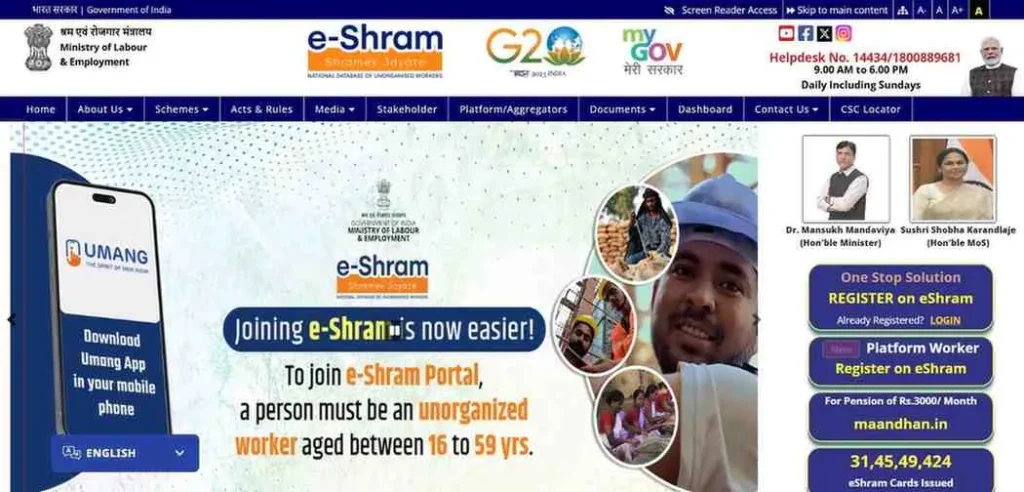
What is the e-Shram Portal?
Think of the e-Shram portal not just as a website but as a national security net. Launched by the Ministry of Labour & Employment, this portal is the first-ever attempt to build a comprehensive database of India’s unorganized workforce. Whether you are a carpenter in Bihar or a delivery partner in Bangalore, this portal recognizes your contribution to the economy.
When you register, you receive a 12-digit Universal Account Number (UAN). Unlike a mobile number or a bank account that might change, your UAN is permanent for life. It acts as a “portable identity.” This means if you move from one state to another for work, your benefits, skill records, and insurance coverage follow you automatically. It’s a one-time registration for a lifetime of recognition.
Eligibility Criteria: Who Can Apply for an e-Shram Card in 2026?
The government has sharpened the focus on who qualifies. To keep the portal beneficial for those who truly need it, you must meet these four simple benchmarks:
- The Age Bracket: You must be between 16 to 59 years old.
- Tax Status: You should not be an active Income Tax payer.
- Formal Sector Exclusion: You must not be a member of the EPFO (Provident Fund) or ESIC (Employee Insurance). Essentially, if you don’t have a “corporate” salary slip, you likely belong here.
- The “Worker” Definition: This includes anyone self-employed, home-based, or working for daily wages.
Social Security for the New Workforce
Most websites forget a huge group of people. If you work in the Gig Economy or as a Platform Worker, you are 100% eligible.
- Delivery Partners: Working for Zomato, Swiggy, or Blinkit.
- Ride-Hailing: Drivers for Ola or Uber.
- Freelance Labor: Urban Company professionals or independent contractors.
e-Shram Card Self Registration Online: Step-by-Step Guide
Registering yourself is free, and in 2026, the portal is faster than ever. Follow these exact steps to ensure your application isn’t rejected.
Required Documents for Error-Free Registration
Before you start, keep these 3 things on your table:
- Aadhaar Number: Your 12-digit identity.
- Aadhaar-Linked Mobile: You must be able to receive an OTP on this number.
- Bank Account Details: Your Bank Account Number and IFSC Code (Look for this on your passbook or cheque leaf).
- (Optional but Recommended): An emergency mobile number and nominee details (spouse/child).
The Registration Flow
- Visit the Portal: Go to the official link: register.eshram.gov.in/#/user/self
- Initial Authentication: On the “Self Registration” pane, enter your Aadhaar-linked mobile number.
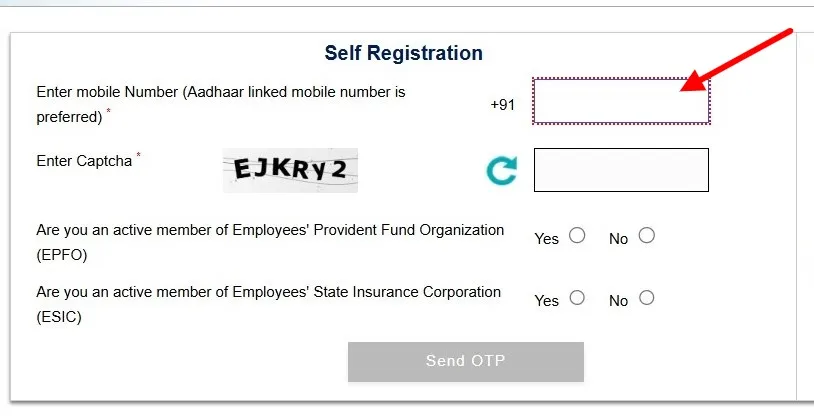
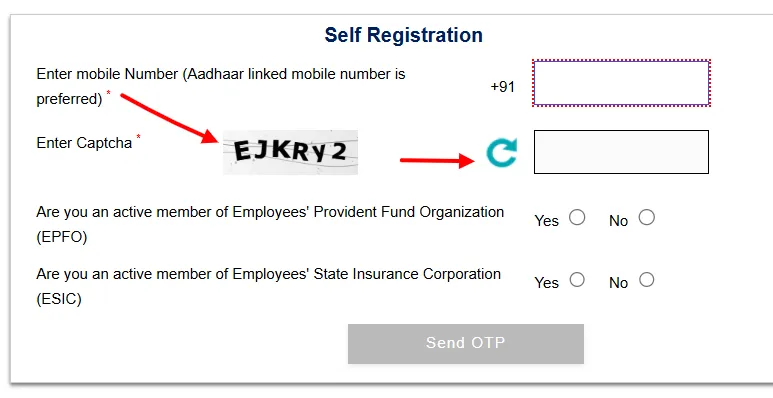
- Solve the Captcha: Type the letters/numbers exactly as shown.
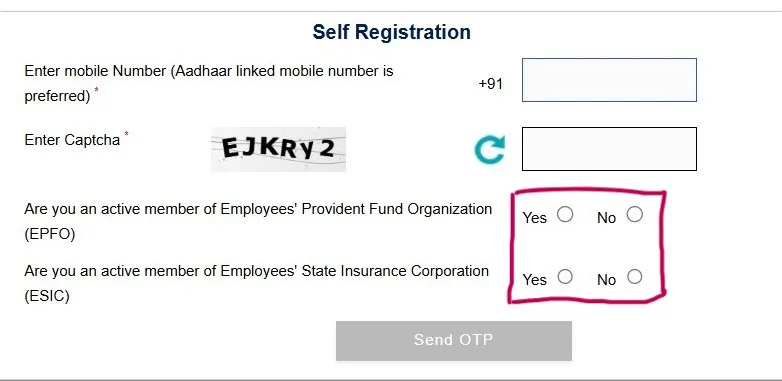
- EPFO/ESIC Declaration: Click ‘No’ for both if you are an unorganized worker. Click ‘Send OTP’.
- Aadhaar e-KYC: Enter your Aadhaar number. Choose the ‘OTP’ method (Biometric is only for CSC centers).
- Fill the 6 Profile Sections: * Personal Info: (Email, Marital status).
- Address: (Current and Permanent).
- Education: (Your highest qualification).
- Occupation: Select your Primary Occupation. If you don’t find it, search for the NCO Code.
- Bank Details: Ensure the account is active for Direct Benefit Transfer (DBT).
- Preview & Submit: Review everything. Correct any spelling mistakes in your name or bank IFSC. Submit to generate your UAN.
How to Download e-Shram Card PDF (3 Working Methods)
Once registered, you should keep a digital copy of your UAN card on your phone. Here are the three official ways to get it in 2026.
Method 1: Download by Aadhaar Number & OTP (Fastest)
If you’ve lost your card or forgot your UAN, do this:
- Go to the e-Shram homepage and click “Already Registered? Update”.
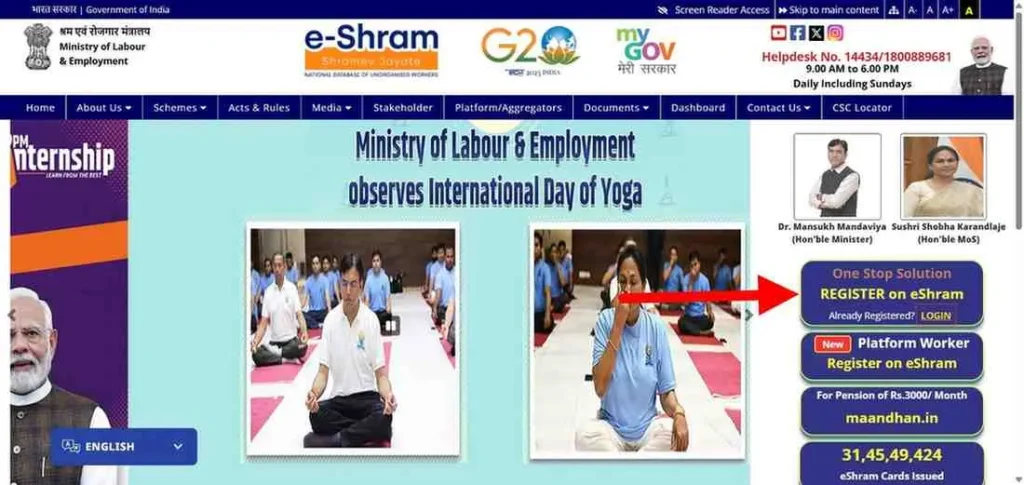
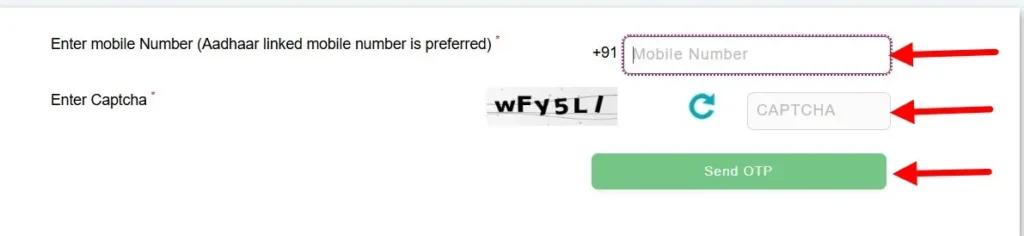
- Enter your Aadhaar-linked mobile number and the Captcha.
- Verify with the OTP.
- On the dashboard, click the big green button: “Download UAN Card”.
Method 2: Download by UAN Number (Direct Login)
If you already know your 12-digit Universal Account Number:
- Select the “Login Using UAN” option on the portal.
- Enter your UAN Number, Date of Birth, and the Captcha.
- Click “Generate OTP”. Once verified, your PDF card will be ready for download.
Method 3: Download via DigiLocker or UMANG App
The government has integrated e-Shram with the “Paperless Governance” initiative:
- DigiLocker: Open the app, search for “Ministry of Labour,” select “UAN Card,” and enter your Aadhaar. It will permanently save your card in your “Issued Documents.”
- UMANG App: Search for the “e-Shram (One Stop Solution)” service. Log in with your mobile number to view and download your card anytime.
e-Shram Card Check Balance & Payment Status
One of the most frequent questions workers ask is: “When will the next installment arrive?” Whether it is the Central Government’s relief fund or State-specific schemes like the Bhartan Poshan Bhatta (Maintenance Allowance), tracking your money is now a digital process.
You don’t need to visit a bank to check your e-Shram balance. Here are the three official, working methods to verify your payment status in 2026.
1. Check via the UPSSB Portal (For Bhartan Poshan Bhatta)
If you are a worker from Uttar Pradesh, the state government often sends maintenance allowances (typically ₹500 or ₹1000 installments) directly to your bank account.
- Step 1: Visit the official Social Security Board portal: upssb.in
- Step 2: Look for the link labeled “E-Shram” or “Bhartan Poshan Bhatta Yojana”.
- Step 3: Enter the Mobile Number you used during e-Shram registration.
- Step 4: Click ‘Search’. If the payment was successful, you will see the amount, bank name, and the “Success” status.
2. The PFMS “Know Your Payment” Method
Since e-Shram benefits are sent via DBT (Direct Benefit Transfer), the PFMS (Public Financial Management System) portal is the most reliable source for all India.
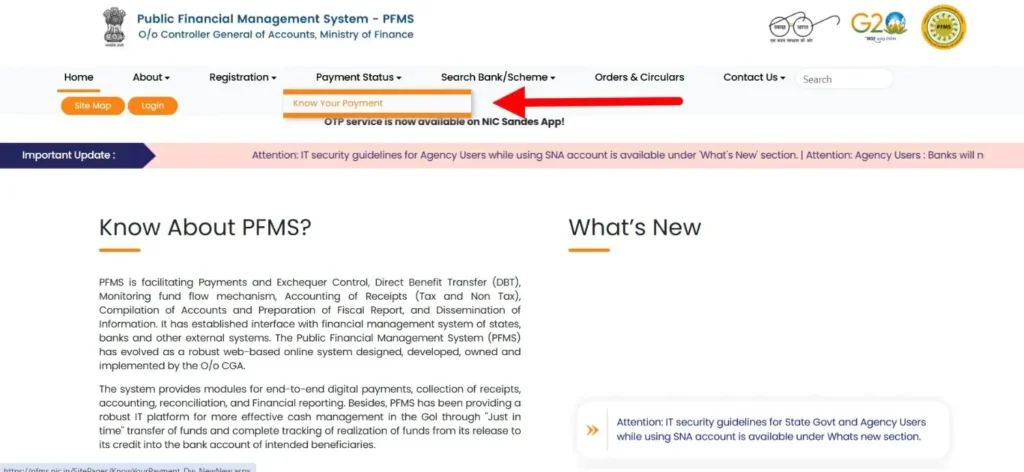
- Step 1: Go to
pfms.nic.in. - Step 2: Click on the “Know Your Payments” section.
- Step 3: Enter your Bank Name and Account Number.
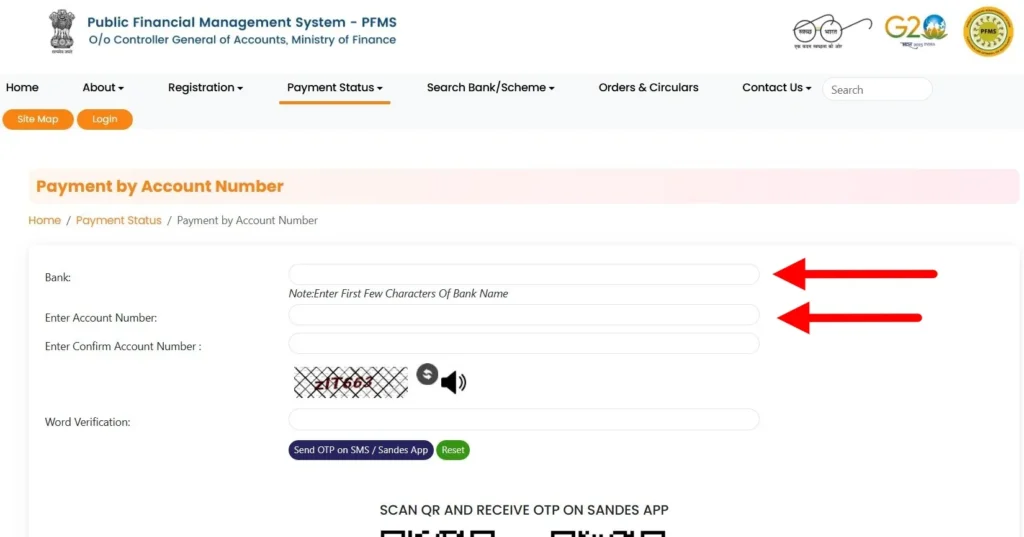
- Step 4: Complete the Word Verification (Captcha) and click “Send OTP on Registered Mobile Number”.
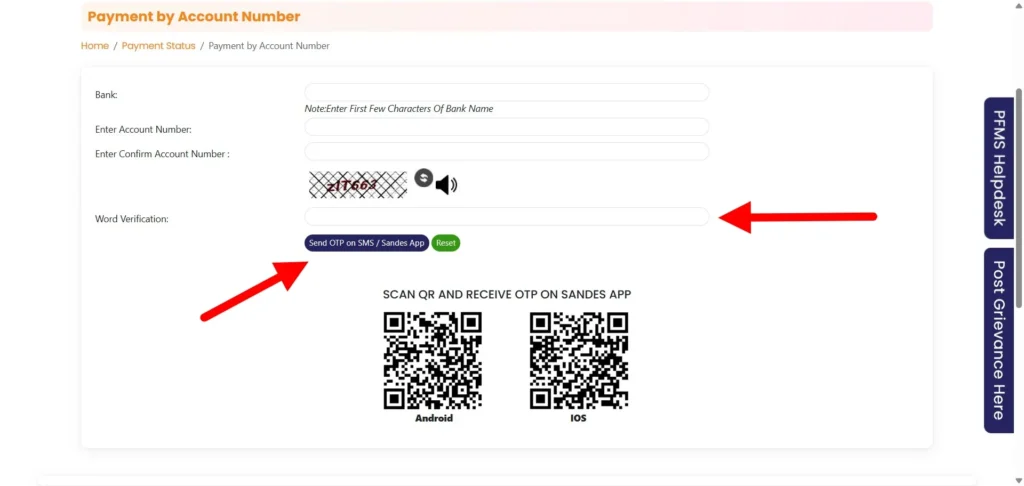
- Step 5: Enter the OTP to see a detailed list of all government subsidies (including e-Shram) credited to your account.
3. Using the UMANG App (One-Stop Tracking)
If you prefer using your smartphone, the UMANG app is the best tool for 2026.
- Step 1: Log in to the UMANG App using your MPIN or OTP.
- Step 2: Search for “PFMS”.
- Step 3: Select “Know Your Payment Status”.
- Step 4: Enter your account details. It will show you exactly when the e-Shram installment was processed by the ministry.
Important: Why is my e-Shram Balance showing ₹0?
If your coworkers received the payment but you didn’t, it is usually due to one of these three reasons:
- Aadhaar Seeding Issue: Your bank account must be linked to your Aadhaar for DBT. Check this at your bank branch.
- KYC Pending: If you haven’t updated your e-Shram profile in over a year, the system may pause payments.
- Wrong IFSC Code: If your bank was recently merged (e.g., Allahabad Bank into Indian Bank), ensure your new IFSC is updated on the e-Shram portal.
Exclusive e-Shram Card Benefits for Pregnancy (PMMVY Integration)
Many women ask, “Does the e-Shram card give money for pregnancy?” The answer is a big Yes, but it works through a clever integration. Having an e-Shram card automatically qualifies you as a “socially and economically disadvantaged worker,” making it much easier to claim benefits under the Pradhan Mantri Matru Vandana Yojana (PMMVY).
The benefit amount is specifically designed to help you rest and stay healthy:
- For the First Child: You receive ₹5,000 in two installments.
- Installment 1 (₹3,000): After your first Ante-Natal Check-up (ANC).
- Installment 2 (₹2,000): After the child is born and completes the 14-week vaccination cycle.
- For the Second Child (Girl Child): To promote the safety of the girl child, you receive a single installment of ₹6,000.
How to claim using your e-Shram card: When you visit your local Anganwadi Centre or use the PMMVY 2.0 Portal, simply present your e-Shram UAN card as your eligibility proof. Since your bank account is already “Aadhaar-seeded” for e-Shram, the maternity cash is transferred directly to your account via DBT without any extra paperwork.
Social Security & Insurance: How to Claim the ₹2 Lakh Benefit
Every e-Shram registration comes with a built-in accidental insurance cover called PMSBY (Pradhan Mantri Suraksha Bima Yojana). For the first year, the government pays the premium for you. In later years, a tiny amount of ₹20 is auto-debited annually to keep you covered.
What is covered?
- Accidental Death: ₹2,00,000 (2 Lakh) to the nominee.
- Permanent Total Disability: ₹2,00,000 (Loss of both eyes or both hands/feet).
- Partial Disability: ₹1,00,000 (Loss of one eye or one hand/foot).
Step-by-Step Claim Process
If an unfortunate accident occurs, the nominee (family member) must act quickly:
- Notification: Inform the bank where the e-Shram linked account is held within 30 days of the accident.
- Required Documents:
- Original FIR or Panchnama (for police cases).
- Post-Mortem Report and Death Certificate (for death claims).
- Disability Certificate from a Civil Surgeon (for disability claims).
- Copy of the e-Shram UAN Card.
- Submission: Fill out the PMSBY Claim Form (available at the bank or Jan Suraksha portal) and submit it with the documents.
- Verification: The bank verifies the e-KYC and forwards it to the insurance company (like LIC or New India Assurance). The money is usually credited within 30 to 60 days.
Solving Common Registration & Update Issues
Even with the portal upgrades, technical glitches can happen. Here is how to fix the most common “e-Shram headaches” without visiting a cyber cafe.
- Issue 1: Mobile Number Not Linked to Aadhaar
- The Problem: You can’t get the OTP because your current SIM isn’t linked to your Aadhaar card.
- Fix: You cannot fix this online at home. You must visit the nearest CSC (Common Service Centre) or an Aadhaar Seva Kendra. They will use your Fingerprint (Biometric) to register you. Once done, ask them to link your new mobile number to your Aadhaar for future updates.
- Issue 2: OTP Not Received (SMS Timeout)
- The Problem: You wait for the code, but it never arrives.
- Fix: First, check if your SMS inbox is full. If not, the server might be busy. Tip: Try registering early in the morning (before 8 AM) or late at night (after 10 PM) when the government server load is lowest. Also, ensure you haven’t blocked “Short-code SMS” in your phone settings.
- Issue 3: UAN Card Not Showing Photo
- The Problem: You download the PDF, but the photo area is blank.
- Fix: This usually happens when the Aadhaar server is slow to provide your image data. Don’t worry—your card is still valid. Wait 24–48 hours and try the “Update Profile” option. Re-verify your Aadhaar e-KYC, and the photo will usually appear in the next download.
Frequently Asked Questions
Can students apply for an e-Shram card?
Yes, but only if they are above 16 years old and are working part-time in the unorganized sector (like home tutoring, delivery, or shop assistance). Regular full-time students who are not working should avoid registering, as the card is specifically for “workers.”
How to update a changed mobile number in e-Shram?
Log in to the portal using your Aadhaar number. Go to the ‘Update Profile’ section. You will see an option to edit your mobile number. Note: You will need the OTP from the number currently linked to your Aadhaar to complete this change.
Is the e-Shram card valid outside my home state?
Absolutely. One of the main goals of the UAN (Universal Account Number) is Portability. Whether you move from UP to Gujarat or Bihar to Delhi, your card and its benefits remain valid across all of India.
Official Helpdesk & Grievance Redressal
If your money is stuck or your profile is locked, don’t wait. Use these official channels:
- National Toll-Free Helpline: Dial 14434 or 1800-889-6811. (Support is available in 10+ languages including Hindi, English, Tamil, and Bengali).
- Operating Hours: 9:00 AM to 6:00 PM (Monday to Sunday).
- Grievance Portal: Visit the official “Grievance” link on
eshram.gov.into lodge a formal complaint and track its status using your mobile number.
e-Shram Resources & Official Government Directory
To save you from clicking on fake or confusing links, we have compiled the essential “One-Stop” directory for the e-Shram portal in 2026. Bookmark this page to ensure you always access the genuine government servers.
Important Links to Official Portals
| Service Name | Official Portal Link (2026) | Purpose |
| Main e-Shram Portal | eshram.gov.in | General Info & Dashboard |
| Self-Registration | register.eshram.gov.in | New Registration / Card Download |
| Payment Tracking | pfms.nic.in | Check DBT Balance Status |
| Pension Enrollment | maandhan.in | Join PM-SYM (₹3000 Pension) |
| Job Search | ncs.gov.in | National Career Service Integration |
State-wise Labour Department Directory
While the e-Shram card is a National (Central) initiative, your financial installments (like the Bhatta) are often managed by your specific state’s Labour Department. If you have state-specific queries, visit your local portal:
- Uttar Pradesh:
upssb.in(Social Security Board) - Bihar:
labour.bih.nic.in - Madhya Pradesh:
labour.mp.gov.in - Rajasthan:
labour.rajasthan.gov.in - West Bengal:
wblabour.gov.in - Haryana:
hrylabour.gov.in
Need Immediate Help? Official Support Channels
If you are facing a technical error that our guide couldn’t solve, please contact the Ministry of Labour & Employment directly:
- National Toll-Free Number:14434 or 1800-889-6811
- (Available 9 AM to 6 PM, Monday to Sunday in 10+ languages)
- Official Email Support:
[email protected] - Grievance Portal:
gms.eshram.gov.in(Use this for official complaints regarding rejected cards or missing payments).